

eDiscovery Document Review: Strategy Is Half the Battle
Learn how to simplify and streamline the document review process in ediscovery with these tips and strategies.


Document Review Series / Part One
When most people think about ediscovery, they probably imagine a lawyer staring intently at a computer screen, hoping to find an incriminating document in a massive database of collected files.
If that is your mental image, what you are picturing is the document review process in ediscovery. However, if you’ve read our eBook on culling and filtering, you know that “review” is just one part of the modern discovery process. In part one of our three-part blog series, we begin our deep dive into the aspects of executing a successful ediscovery document review.
eDiscovery Document Review Preparation
Review is just one phase of ediscovery, and looking for incriminating evidence is just one small part of the process. There is a lot of blocking and tackling that must happen before you can unleash teams of lawyers to review evidentiary documents.
Before review, teams have to collect, process, cull, filter, and produce data. Finally, you reach the phase of ediscovery where your team will discover potentially relevant documents and evidence. But even at the review phase, much of your time and effort will be directed at analyzing and organizing files. And even though you’ve already filtered and culled your data, that process will continue during review.
Not All Document Reviews Are the Same
Before you can identify responsive documents, you need a strategy to ensure a review is comprehensive, thorough, and defensible. Of course, there is no one right approach to document review. Small to mid-sized matters might be handled aptly with well-crafted search terms and analytics to identify potentially responsive documents. Large scale-litigation will demand large teams of reviewers, which will require high levels of organization and detailed coding tools.
Too many legal teams go into the document review process blindly, hoping or assuming that they will find responsive documents along the way. A well-organized review team will use analytics and strategic thinking to get a sense of the document collection before any searching or reviewing even takes place. This will help find responsive documents and help make smart decisions about how to allocate resources and what legal strategies to pursue. If a document collection seems unlikely to produce responsive documents, it may be time to reassess your strategy.
Tech Tools of the Document Review Process
For the most efficient review process, begin by giving your reviewers a palette to paint with: modern, intuitive coding tools. They will need these tools to quickly and accurately code documents. That begins with developing a specific coding or tagging “panel” based on an analysis of the issues in the case. Coding panels typically contain data fields for responsiveness, privilege, confidentiality levels, and key documents.
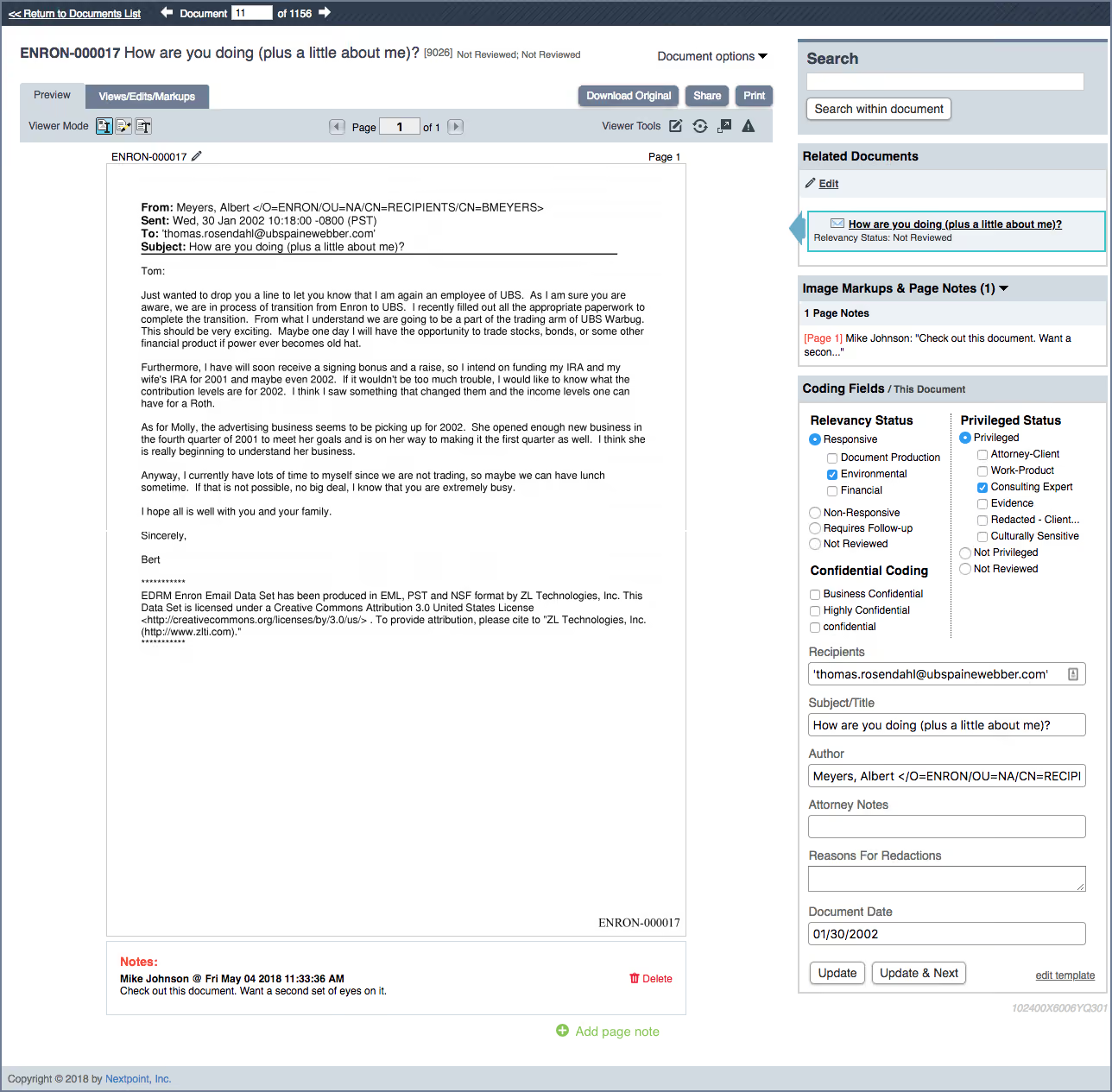
To identify issues, custodians and other relevant items, start with a review of all complaints, pleadings, papers, court orders, discovery requests and responses (if any). From these items, you can glean lists of pertinent names, their roles, and what you know about these individuals so far.
This will help provide context while reviewing the documents, especially email. In business disputes, look for descriptions of financial transactions at issue or examples of accounting issues that may be involved in a matter. Also, consider when and how to use bulk tagging, which can save time and money in the coding process.
The document review process is the most time consuming, error prone and costly part of ediscovery. Create a review guide to define the process and help reviewers make informed and consistent decisions. This guide should be clear, set realistic goals for reviewers, and help to enforce a dependable management structure to oversee the review. Use reporting tools in the software application to track the project and reviewers’ progress.
Limit the Scope of Document Review
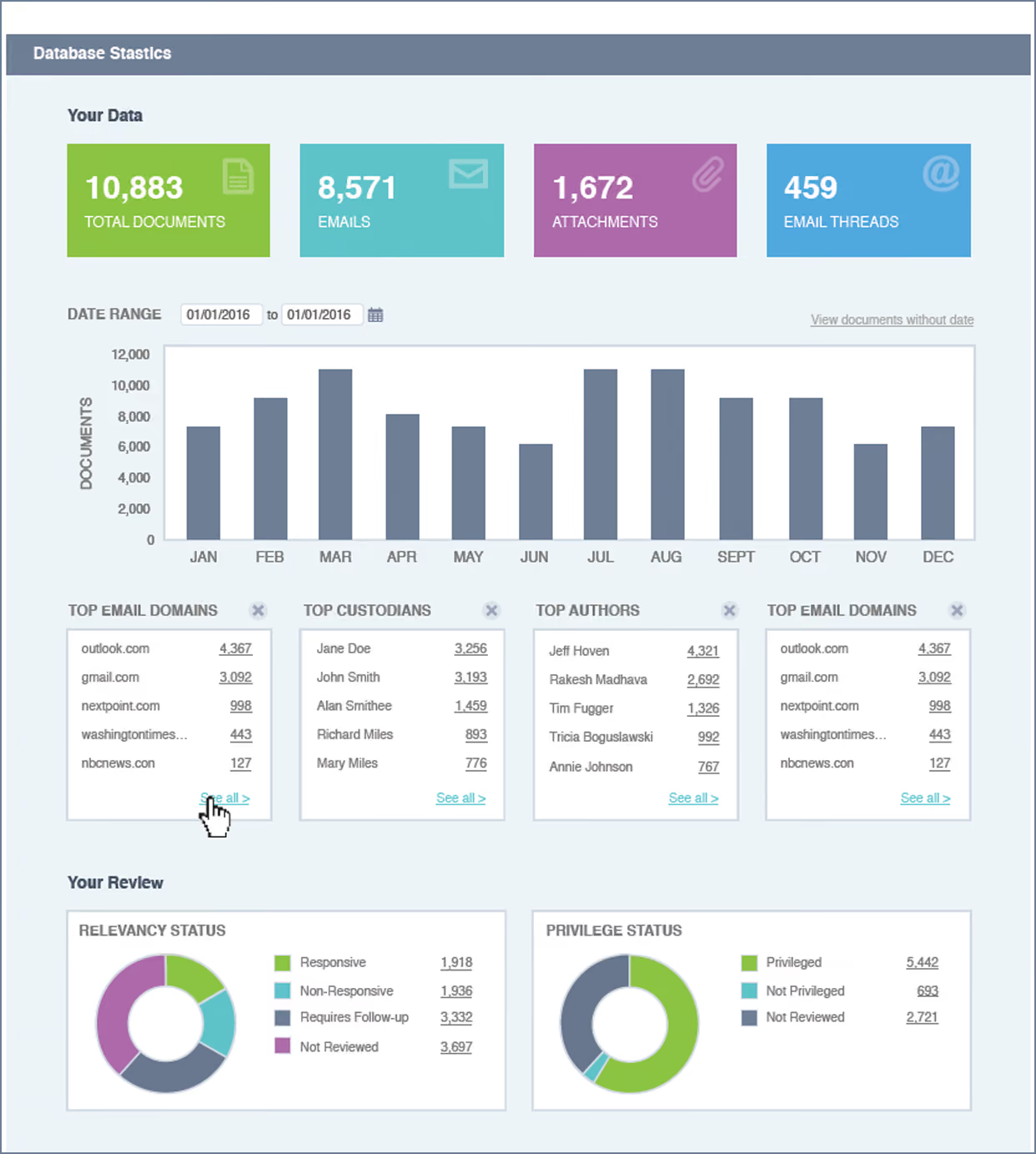
As we discussed in our recent posts on filtering, there are technical and automated processes you can use to limit the scope and cost of discovery. Data filtering should continue during review, but in a more targeted and informed way.
Now that you have your hands on the evidence, it is advisable to use analytics to get a handle on the evidence and eliminate even more documents likely to be unresponsive. Potentially important filtering includes setting date ranges for your review and eliminating more file types, authors, subject lines, and email domains. Look for law firms’ domains and identify users with multiple email domains. This will help ensure you can isolate privileged emails and won’t miss potentially relevant ones.
It is also important to always check your work and have processes in place to ensure your review is defensible.
Before starting review, be sure to:
- Understand how the information was collected and organized
- Make coding fields accurate. Provide clear guidance for reviewers.
- Document your search and review procedure, how you allocated sets of data, and the possible use of predictive coding or other TAR methods (in very rare cases).
- Put a solid Quality Assurance process in place
If these controls and processes are in place, your team can begin actually reviewing the documents in a collection. (We will discuss that process in Part 3 of this blog series.) Remember, time, money and perhaps even the case can be saved with an efficient and effective analysis and organization.
Document Review Experts
Look for Part 2 in our three-part series on eDiscovery Document Review, explaining how to create review sets and manage privilege logs. In the meantime, if you have questions regarding effective review methods, reach out to the experts at Nextpoint. We provide legal services to guide you through each stage of ediscovery, from document collection and data filtering to review and production.
Master eDiscovery Document Review
Download our comprehensive document review eGuide to get everything you need to know for efficient document review.
Parts 2 and 3 in our document review series are now published:
Join our Nextpoint newsletter list
Related Resources
Blog

Blog
The purpose of attorney client privilege is to encourage clients to communicate freely with their attorneys — but the information only remains confidential if you protect it.

Blog

Blog
58% of legal professionals name document review as their top challenge. Here are 6 practical tips for building a review process that scales.
Blog

Blog
Minimize ediscovery costs in the document review phase of litigation with these five expert tips when developing your plan of attack.
Experience Nextpoint for yourself
Learn how our transparent pricing and powerful platform help legal teams streamline litigation from discovery to decision.