

Litigation Tips: Advanced Courtroom Presentation with Nextpoint
More than just courtroom presentation, Theater is geared towards making it fast and easy to get all your evidence in one place.
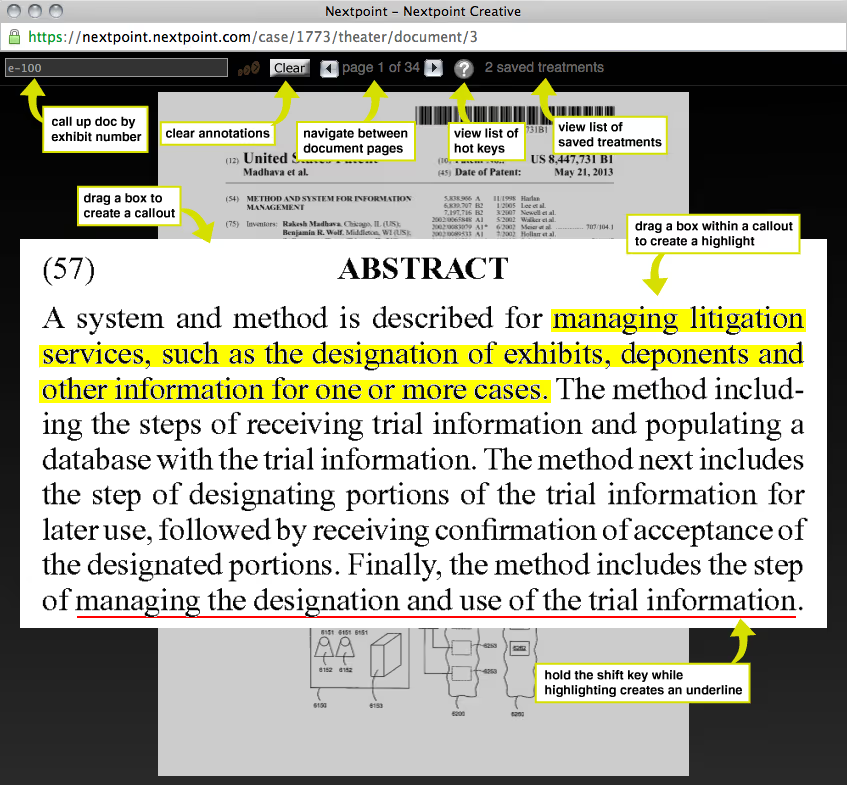
We’ve spent years watching paralegals and associates fetch and annotate large lists of documents for the witness to review. We created Theater, a function within Nextpoint to address the more time-consuming and tedious tasks that bedevil our creative services team and the lawyers they support.
Theater contains the basic functionality to create and annotate document call-outs and can be used in court – as long as the Internet connection is strong and stable. It even works on an iPad!

Courtroom Presentation
But we find many users are only scratching the surface when it comes to Theater, which can provide a lot more than just courtroom presentation functions for those rare, tech-forward courtrooms.
For example, witnesses need to be extremely familiar with the documents they are likely to testify about, and annotations are necessary to call attention to important sections and phrases.
To automate this process, Theater allows attorneys to create and save document annotations for a particular witness. The system saves your notes and can then export one file that will contain the annotated pages assigned to a given witness tag.
Print just that one file, hole punch, and dump it in a binder. Voila! No more standing by the printer, printing file after file and manually marking up pages.
Document Callouts
Theater can also be used to make your briefs and outlines more reader-friendly. Instead of including a site to a document and section, why not include a document call-out itself? Don’t make your reader go hunt for the content, but show them what you want them to read.
Downloading your call-out from Theater is literally a push of a button: the “d” button on your keyboard. Use the “insert” function in Word to pop your annotated call-out into your brief or outline.
Similarly, call-outs created in Theater can be added to PowerPoint slides to create polished document treatments for use in a courtroom presentation. For our creative services clients, we provide a template where one need only use the “change picture” tool to insert all the downloaded call-outs as needed.
If you’re working without a preset template, use the “insert picture” function to add your call-outs and arrange them on the slide as you see fit. No need to battle with PowerPoint cropping or highlight transparencies!
This is just the beginning of Theater’s rich toolset. More than just courtroom presentation, Theater is geared towards making it fast and easy to get all your evidence in one place, whether that be for your witness, your jury or the other members of your trial team. You can learn more by visiting our How It Works page, or the Nextpoint Support site.
Join our Nextpoint newsletter list
Related Resources
Blog

Blog
Learn how to build a compelling trial presentation for construction litigation. Discover tips for using visuals like schematics, diagrams, and more.

Blog

Blog
Learn how to use strong visuals to make your courtroom presentation more impactful in front of a judge, panel, or jury.
Blog

Blog
Discover practical trial presentation technology tips from April Ferguson of OPVEON Trial Consulting.
Experience Nextpoint for yourself
Learn how our transparent pricing and powerful platform help legal teams streamline litigation from discovery to decision.