

The right deposition transcript management software can win your case
Nextpoint's deposition transcript management software has the features you need to organize and prepare designations effectively.


When it comes to deposition transcript management software, no platform handles it better than Nextpoint. The reason is simple.
Nextpoint started as a trial services company 20 years ago, and pretrial litigation workflows are in our DNA. Our product and engineering teams have two decades of experience building innovative software to simplify and expedite the complex tasks pretrial litigation teams need to accomplish.
Do everything you need with deposition transcripts in Nextpoint software
Whether you have only a few deposition transcripts in a simple commercial dispute, or a few thousand in a multi-district litigation (MDL), mass tort, or class action matter, Nextpoint has the purpose-built features your team needs to organize them, collaborate remotely, make designations, record objections, and prepare your case effectively.
The strength of our deposition transcript management software is its simplicity.
Here’s what you'll see:
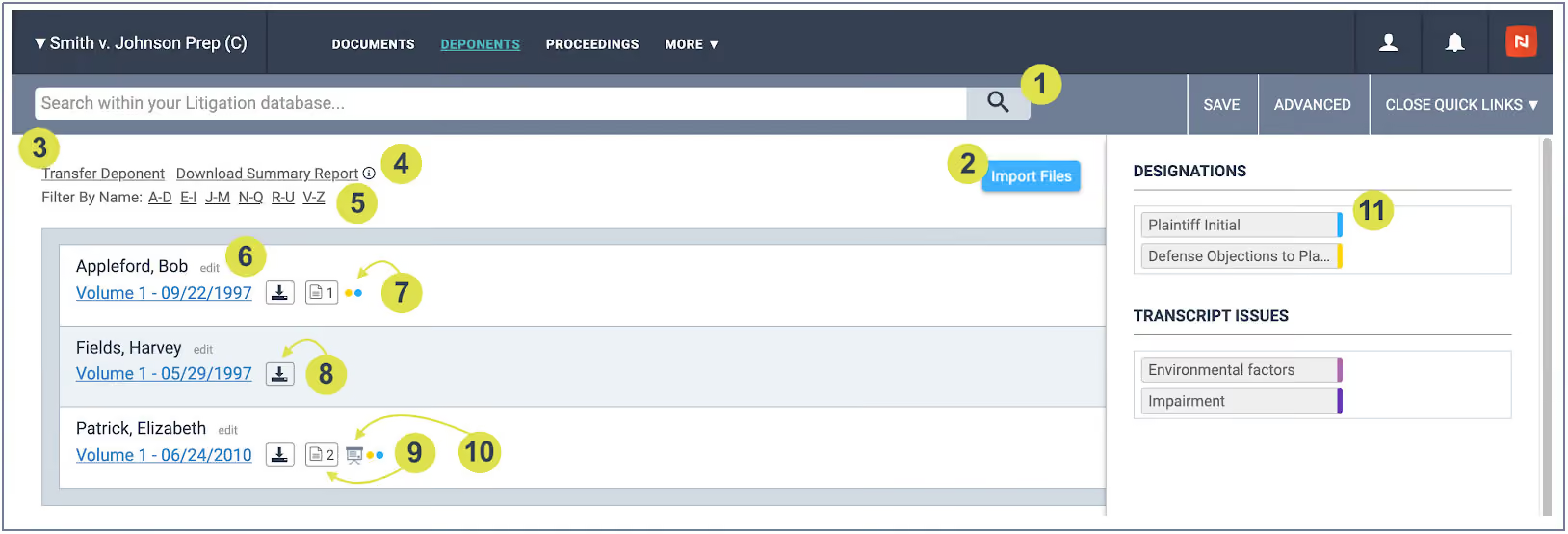
Included in this clear, concise display are a host of useful features to get the information you need.
- Run keyword searches across deposition populations. Download a Search Hit Report across all respective transcripts.
- Import transcript files.
- Transfer Deponent (or Proceeding) transcript to a secondary database.
- Download a Summary Report spreadsheet of all designations/clips.
- Filter alphabetically by transcript.
- Edit transcript (Deponent or Proceeding) name.
- View color-coded designations and issues associated with a deposition.
- Download original transcript file.
- View all documents (exhibits) related to a particular transcript.
- View video associated with a particular transcript.
- View all depositions associated with a designation or issue. Upon clicking, you can also download a Clip Summary Report. This selection option will appear at the top left next to “Transfer Deponent” (#3).
Dive deeper on depositions
If you have upcoming depositions or just want to master your practice – download our Deposition Prep Guide today. It’s filled with useful tips from our experts to make sure your deposition is a success.
The individual transcript pages are equally well-designed and loaded with convenient features:
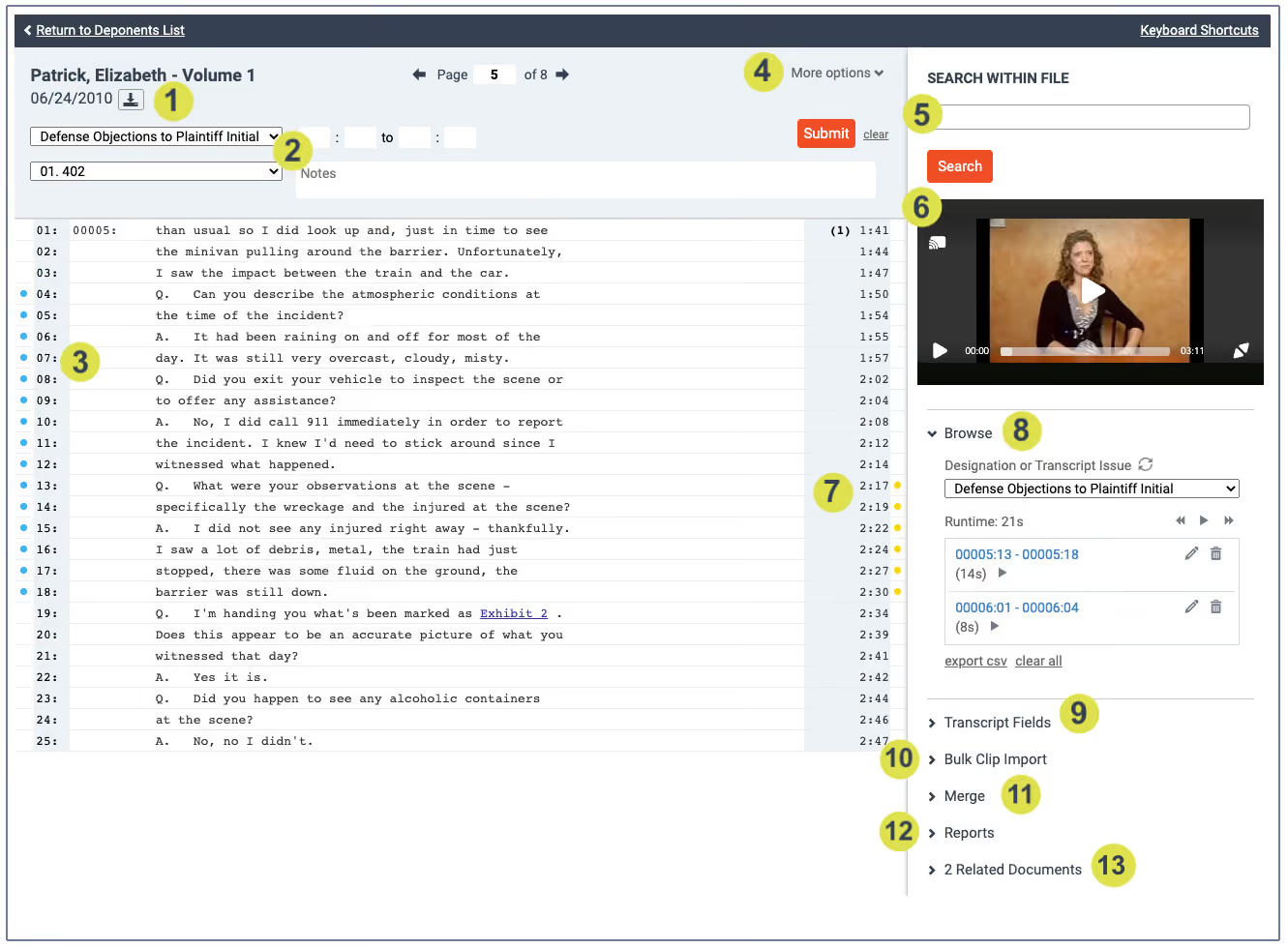
- Download original transcript file.
- Create page/line Designations or Issue Designations
- Designations made will appear as color-coded circles on the left side, or exclamation points if there are notes. Objections will appear on the right.
- Access More options, where you can Download or Delete a transcript file or Edit information.
- Search for keywords within the deposition.
- If there is a video, you may view it here.
- Click on a timestamp to jump to that spot of the video deposition.
- View current designations via the “Browse” drop-down menu. You can toggle between each designation by clicking on the blue hyperlinked text.
- You can create and apply fields to your transcript.
- Designation clips can be bulk imported.
- If you have two sets of designation clips that you need to merge into one comprehensive designation set, you can do so in the “Merge” section.
- Various designation export functions are available, including full pdf, summary pdf (with only designations included), condensed pdf (the full document condensed to 4 pages per pdf page), and a line summary export that lists the page and lines of every designation, in every label or issue, for your deponent. This text file can be used in Trial Director as it is a modifiable .ccs file.
- Relate exhibits to your transcript via a Folder, view related documents from a list, or create/view hyperlinks within the deposition.
See the transcript software
Book a demo to see more Nextpoint transcript management software and our suite of case building and trial prep tools.
Join our Nextpoint newsletter list
Related Resources
Blog

Blog
Taking depositions is arguably the most useful discovery exercise to gather information and build a strong case. Here's how to do it right.

Blog

Blog
In mass tort litigation, the deposition process doesn't just support the case — at scale, it can consume it. Here's how leading firms manage transcript volume, designation workflows, and co-counsel collaboration without losing control.
Blog

Blog
Using AI to summarize legal documents can cut hours off tasks like contract review and transcript analysis.
Experience Nextpoint for yourself
Learn how our transparent pricing and powerful platform help legal teams streamline litigation from discovery to decision.